
I want Fadrio to be the Linux mixer I actually reach for while working and playing. The first working interface had one horizontal slider per application. It proved the plumbing, but I wanted something closer to the channel bank of a mixing console: several applications visible together, with levels you can compare at a glance.
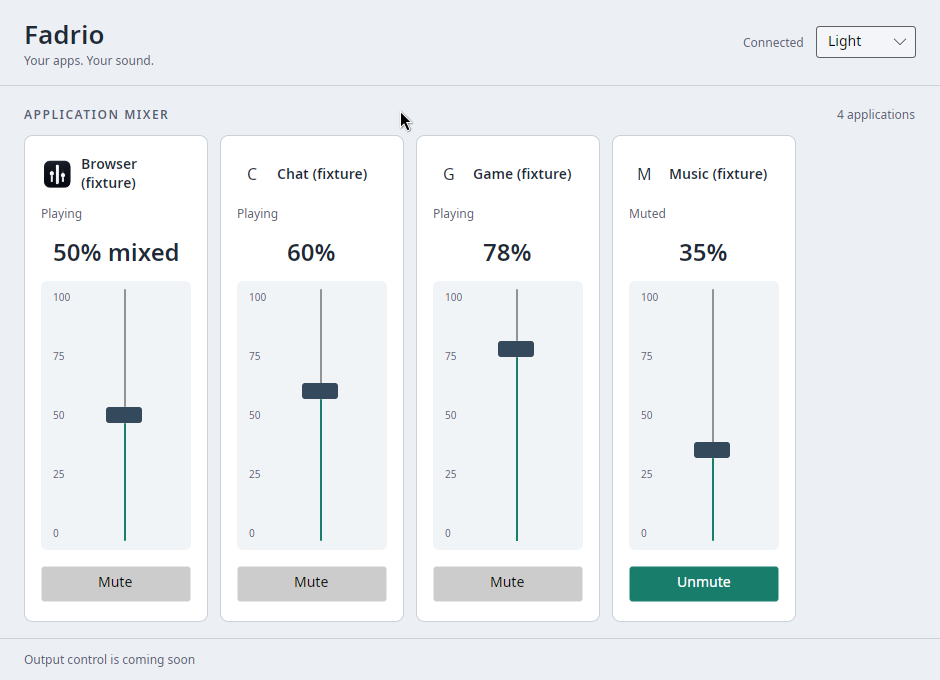
The new window now has vertical application faders, a percentage scale, aligned mute buttons, and selectable System, Light and Dark themes. The screenshot is the actual Avalonia application connected to a private PipeWire daemon. Browser, Chat, Game and Music are controlled silent fixtures, not invented UI or a list of my private applications.
What I borrowed from Voicemeeter
I looked at Voicemeeter Banana's official interface. Its useful idea here is the repeated channel strip: a name at the top, a long vertical fader, and controls that sit at the same height across the bank.
Fadrio applies that layout to logical applications. Each strip contains its icon or initial, name, playback state, percentage and mute control. The fader scale runs from 0 to 100 percent; it does not pretend to be a calibrated decibel meter. Playing, Idle and Muted remain readable text. The new muted button also has a distinct appearance in both themes.
This is still Fadrio's own interface and artwork. Voicemeeter's buses, routing matrix and effects are outside this application's scope. The useful goal is quick application control, not fitting a recording studio into a volume popup.
Four strips, five streams
The Browser fixture owns two streams, initially at 20% and 80%. Fadrio groups them into one strip showing 50% mixed. Chat is at 60%, Game at 78%, and Music is muted with its level retained at 35%.
That example makes the application's central rule visible: two browser streams do not become two browser controls. Moving a mixed fader sets every stream owned by that application to the chosen level. The tooltip and accessibility help explain this; a single number should not conceal the operation behind it.
The application count also counts logical applications. During an active gesture, structural changes wait until the gesture ends, preserving the controls under your pointer. A disappearing target disables immediately, and commands still use the native PipeWire bridge.
A wider window that can shrink
The development window opens at 940 × 680. At 420 pixels wide, the same strips remain available through horizontal scrolling rather than squeezing each fader into a sliver. The Light theme uses a contrasting dark thumb; Dark uses a pale thumb with a mint track. Theme selection currently lasts for the session only.
The local icon work from the previous development slice stays intact: validated local PNGs load asynchronously, with a readable initial when an icon is missing or cannot be decoded. The malformed PNG regression remains in the desktop check. An icon should not get promoted to application supervisor.
What I actually checked
The local suite passes 111 managed tests, including 25 UI cases, plus two native tests and the isolated PipeWire integration scenario. Formatting, roadmap checks and six Python roadmap tests pass too.
The real rendered desktop check moves the vertical fader to 37%, reaches 10% with Home followed by ten Up keys, and mutes the stream. It repeats those controls with a damaged icon, disconnects the private PipeWire daemon during a drag, restarts it, and verifies the recovered controls. The four-application capture separately checks the mixed level, muted state, both themes and narrow-window layout.
These are GNOME Wayland desktop checks through XWayland using normal host fonts and isolated silent streams. They do not qualify native Wayland, KDE, fractional scaling, screen readers or an installed package. The earlier font-startup stall's root cause also remains open; it has not reproduced in these checks.
The console implementation is merged in Fadrio PR #110, after both required Linux and native sanitizer checks passed. The earlier local-icon implementation is PR #109. View the actual light-theme capture.
What comes next
This advances the application-control part of FAD-0502. Output-device controls, remembered application levels, pinned inactive applications and tray/single-instance behavior still need work. There is no new supported binary release: Fadrio remains a source-only public alpha.
For daily use, which would help you most next: remembered levels, pinned controls for currently silent applications, or quick access from the tray?